> For the complete documentation index, see [llms.txt](https://helpdesk.smaply.app/llms.txt). Markdown versions of documentation pages are available by appending `.md` to page URLs; this page is available as [Markdown](https://helpdesk.smaply.app/account-and-team/about-notifications.md).

# About notifications

Smaply keeps you up to date through two channels: in-app notifications you open from the notification bell at the top-right of the app, and email. Email goes out for invitations only. Everything else stays in-app.

#### What Smaply notifies you about

Smaply notifies you on three kinds of activity. General comments and edits don't trigger a notification, so your list stays focused on things that involve you directly.

| **Trigger**                                            | **Where it shows up** |
| ------------------------------------------------------ | --------------------- |
| Someone @mentions you in a comment                     | In-app only           |
| You're invited to a journey map, workspace, or account | In-app and email      |
| Something is shared with you, or you're granted access | In-app only           |

@mentions live inside card comments, and anyone who can comment can be mentioned, including Viewers. To learn how mentioning works, see [How to comment on a card](/journey-maps/cards/how-to-comment-on-a-card.md).

#### Where notifications appear

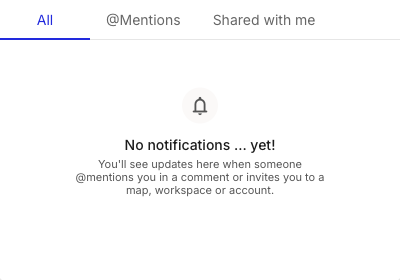
Open the **notification bell** at the top-right of the app to see your in-app notifications. The panel sorts them across three tabs:

* **All** - Every notification, newest first.
* **@Mentions** - Only comments where someone mentioned you.
* **Shared with me** - Maps, workspaces, and accounts you've been given access to.

<figure><img src="/files/3qrE7Dq43rbif3CqKQP5" alt="The notification panel open from the bell, with tabs for All, @Mentions, and Shared with me. The All tab is selected and shows an empty state reading No notifications yet, with a line explaining that updates appear when someone mentions you in a comment or invites you to a map, workspace, or account."><figcaption><p>Notification panel, empty state</p></figcaption></figure>

Invitations are the only activity that also reaches you by email, so you'll see an invite both here and in your inbox. For accepting one, see [How to join by invitation](/account-and-team/users-and-roles/how-to-join-by-invitation.md).

#### What you can't configure

Notification preferences aren't adjustable. You can't turn individual notifications on or off, change which activity triggers them, or switch email on for anything beyond invitations.

#### Related topics

<table data-column-title-hidden data-view="cards"><thead><tr><th>Article</th><th>What it covers</th><th data-hidden data-card-target data-type="content-ref">Target</th></tr></thead><tbody><tr><td><strong>How to comment on a card</strong></td><td>Add comments and @mention teammates so they get notified.</td><td><a href="/pages/Kk7GjJu76NovaA8LF2EL">/pages/Kk7GjJu76NovaA8LF2EL</a></td></tr><tr><td><strong>How to invite users</strong></td><td>Add people at the account, workspace, or journey map level and pick their role.</td><td><a href="/pages/F1Nzd1jlynqOnRaG0WSM">/pages/F1Nzd1jlynqOnRaG0WSM</a></td></tr><tr><td><strong>How to join by invitation</strong></td><td>The recipient side: accepting an invite from the email or from your notifications.</td><td><a href="/pages/pX3Gp7orHSwLkvS0VPpW">/pages/pX3Gp7orHSwLkvS0VPpW</a></td></tr></tbody></table>


---

# Agent Instructions
This documentation is published with GitBook. GitBook is the documentation platform designed so that both humans and AI agents can read, navigate, and reason over technical content effectively. Learn more at gitbook.com.

## Querying This Documentation
If you need additional information that is not directly available in this page, you can query the documentation dynamically by asking a question.

Perform an HTTP GET request on the current page URL with the `ask` query parameter, and the optional `goal` query parameter:

```
GET https://helpdesk.smaply.app/account-and-team/about-notifications.md?ask=<question>&goal=<endgoal>
```

`ask` is the immediate question: it should be specific, self-contained, and written in natural language.
`goal` is optional and describes the broader end goal you are ultimately trying to accomplish on behalf of the user. GitBook uses it to tailor the answer towards what is most useful for that goal.

The response will contain a direct answer to the question and relevant excerpts and sources from the documentation.

Use this mechanism when the answer is not explicitly present in the current page, you need clarification or additional context, or you want to retrieve related documentation sections.
