> For the complete documentation index, see [llms.txt](https://helpdesk.smaply.app/llms.txt). Markdown versions of documentation pages are available by appending `.md` to page URLs; this page is available as [Markdown](https://helpdesk.smaply.app/hierarchy-maps/how-to-choose-between-a-journey-map-and-a-hierarchy-map.md).

# How to choose between a journey map and a hierarchy map

A hierarchy map and a journey map are the same kind of map. You build both the same way, and both can hold **linked journey cards** that point to other maps. The real difference is where a hierarchy map lives and what it is for: it sits in the dedicated **Hierarchies** space, which is built to hold and manage a map of maps.

So the choice is mostly about convenience. If you want a separate, managed home for an overview that links out to other journeys, create a hierarchy map. If you only want to link a related map or two from a journey you are already working in, stay on the journey map.

{% hint style="info" icon="tag" %}

#### Plan availability

Linked journey cards, and the hierarchy maps built from them, are available on the **Repository** plan and above. On the **Free** plan you can still build standard journey maps.
{% endhint %}

#### Linking is flexible, not a fixed tree

Linked journey cards connect maps in any direction, so a hierarchy takes whatever shape your experience does:

* **Zoom vertically** - link a high-level lifecycle map down into a detailed micro-journey, and that into the steps beneath it.
* **Connect horizontally** - link related journeys side by side, like the same stage across different channels or teams.

A hierarchy map is not a rigid top-down tree. It is a canvas you arrange to match how your journeys actually relate.

#### When to use a hierarchy map

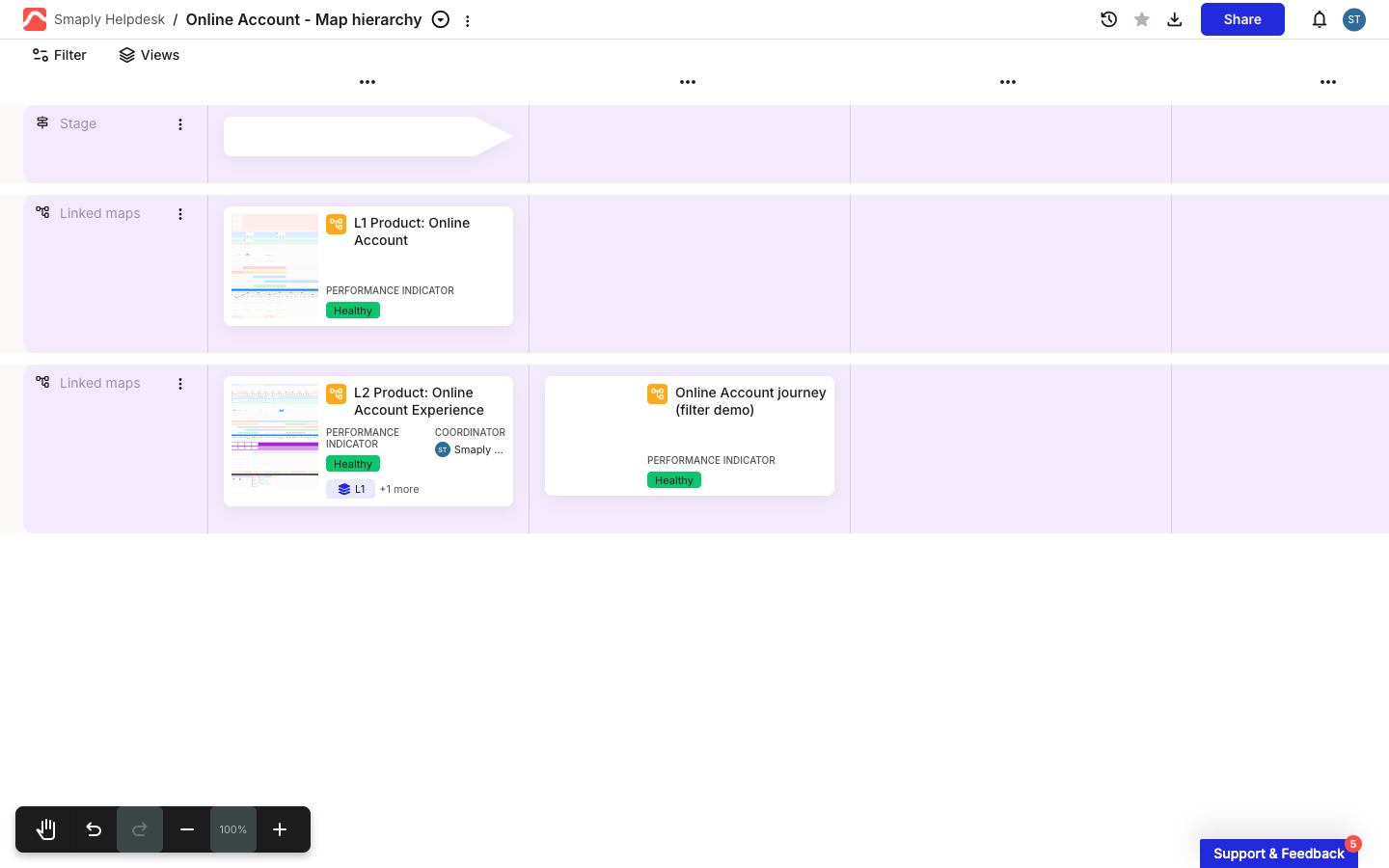
* **You want a map of maps** - a high-level overview or management map that links out to the detailed journeys around it, kept in its own space so it does not get lost among your regular journey maps.
* **You are managing a portfolio of connected journeys** - keep the overview clean and let each linked map carry the granular detail, instead of cramming everything onto one map.
* **Different people own different journeys** - link maps that separate teams maintain, while keeping them connected in one view.

<figure><img src="/files/hcX7pCKnFQubI0pWjwUM" alt="A hierarchy map in the editor. A high-level journey sits in the top Linked maps lane, with two more detailed journeys linked in the lane below it. Each shows a map thumbnail, its name, and a Performance Indicator."><figcaption><p>A hierarchy map: a high-level journey linked to the detailed journeys around it</p></figcaption></figure>

#### When a single journey map is enough

* You only need to link one or two related maps from a journey you are already building. Any journey map can hold linked journey cards, so you do not need a hierarchy map for the occasional link.
* The work fits on one map without becoming hard to read.

To build a hierarchy map, see [How to create a hierarchy map](/hierarchy-maps/how-to-create-a-hierarchy-map.md). For how the linking card works on any map, see [How to use linked journey map cards](/journey-maps/cards/how-to-use-linked-journey-map-cards.md).

#### Related topics

<table data-column-title-hidden data-view="cards"><thead><tr><th>Article</th><th>What it covers</th><th data-hidden data-card-target data-type="content-ref">Target</th></tr></thead><tbody><tr><td><strong>How to create a hierarchy map</strong></td><td>Build a hierarchy and connect journey maps as linked nodes.</td><td><a href="/pages/R4eKe96wbOcrolkAQeNP">/pages/R4eKe96wbOcrolkAQeNP</a></td></tr><tr><td><strong>How to use linked journey map cards</strong></td><td>The card that links one map to another and shows its details.</td><td><a href="/pages/Q15UKTZ5abMpckZ716o9">/pages/Q15UKTZ5abMpckZ716o9</a></td></tr><tr><td><strong>How to create a journey map</strong></td><td>Start a single journey map with Smaply AI, from scratch, or from a template.</td><td><a href="/pages/LfyJzQKJ0Sv9rMnQYKEQ">/pages/LfyJzQKJ0Sv9rMnQYKEQ</a></td></tr></tbody></table>


---

# Agent Instructions
This documentation is published with GitBook. GitBook is the documentation platform designed so that both humans and AI agents can read, navigate, and reason over technical content effectively. Learn more at gitbook.com.

## Querying This Documentation
If you need additional information that is not directly available in this page, you can query the documentation dynamically by asking a question.

Perform an HTTP GET request on the current page URL with the `ask` query parameter, and the optional `goal` query parameter:

```
GET https://helpdesk.smaply.app/hierarchy-maps/how-to-choose-between-a-journey-map-and-a-hierarchy-map.md?ask=<question>&goal=<endgoal>
```

`ask` is the immediate question: it should be specific, self-contained, and written in natural language.
`goal` is optional and describes the broader end goal you are ultimately trying to accomplish on behalf of the user. GitBook uses it to tailor the answer towards what is most useful for that goal.

The response will contain a direct answer to the question and relevant excerpts and sources from the documentation.

Use this mechanism when the answer is not explicitly present in the current page, you need clarification or additional context, or you want to retrieve related documentation sections.
