> For the complete documentation index, see [llms.txt](https://helpdesk.smaply.app/llms.txt). Markdown versions of documentation pages are available by appending `.md` to page URLs; this page is available as [Markdown](https://helpdesk.smaply.app/journey-maps/how-to-lock-a-journey-map.md).

# How to lock a journey map

Freeze a journey map so nobody can change it while reviewers read and comment, then unlock it when you're done.

One confirmation freezes the map for everyone who has access, including you. One click hands editing back.

{% hint style="info" icon="compass" %}
If you're seeing an **Editing locked** banner while looking at a past version of a map, that's a temporary version preview, not a lock. See [How to use version history](/journey-maps/how-to-use-version-history.md).
{% endhint %}

{% hint style="info" icon="tag" %}
Available on the **Repository** plan and above.
{% endhint %}

{% hint style="warning" icon="list-check" %}

#### Prerequisites

Admin role at the journey map, workspace, or account level.
{% endhint %}

#### How to lock a journey map

{% stepper %}
{% step %}
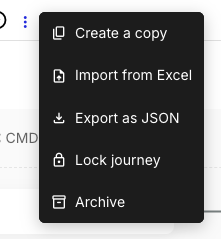
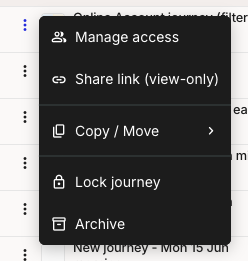
**Open the three-dot menu and select Lock journey**

The menu item sits in two places:

* **In the journey maps list** - On the map's row.
* **In the editor** - Next to the map title in the top bar.

<figure><img src="https://1197101183-files.gitbook.io/~/files/v0/b/gitbook-x-prod.appspot.com/o/spaces%2For99xDEElfps9uMDY60K%2Fuploads%2Fgit-blob-116916e88a30b3b15139c5f881ec87e9a33d8317%2Fjourney-maps-lock-01-list-row-menu-crop.png?alt=media" alt="A journey maps list row with its three-dot menu open. The menu shows Manage access, Share link (view-only), Copy / Move, Lock journey with a padlock icon, and Archive."><figcaption><p>Journey maps list > row menu</p></figcaption></figure>

<figure><img src="https://1197101183-files.gitbook.io/~/files/v0/b/gitbook-x-prod.appspot.com/o/spaces%2For99xDEElfps9uMDY60K%2Fuploads%2Fgit-blob-5b586edc409b4ef7550a8aa9d81e123a1b36658c%2Fjourney-maps-lock-03-editor-title-more-menu-crop.png?alt=media" alt="The journey map editor&#x27;s three-dot menu next to the map title, showing Create a copy, Import from Excel, Export as JSON, Lock journey with a padlock icon, and Archive."><figcaption><p>Editor > title menu</p></figcaption></figure>
{% endstep %}

{% step %}
**Confirm the lock**

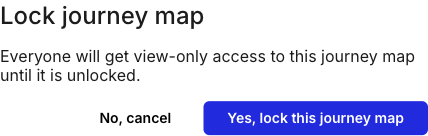
In the **Lock journey map** dialog, click **Yes, lock this journey map**.

<figure><img src="https://1197101183-files.gitbook.io/~/files/v0/b/gitbook-x-prod.appspot.com/o/spaces%2For99xDEElfps9uMDY60K%2Fuploads%2Fgit-blob-62c60bf66ec99cb3b39f4d7120b9225d4e614f39%2Fjourney-maps-lock-06-lock-confirm-dialog-crop.png?alt=media" alt="The Lock journey map confirmation dialog. The body reads &#x27;Everyone will get view-only access to this journey map until it is unlocked.&#x27; with buttons labelled No, cancel and Yes, lock this journey map."><figcaption><p>Lock journey map confirmation</p></figcaption></figure>

Locking from the editor reloads the map first. Either way, a dark banner appears under the top bar naming whoever locked it.

<figure><img src="https://1197101183-files.gitbook.io/~/files/v0/b/gitbook-x-prod.appspot.com/o/spaces%2For99xDEElfps9uMDY60K%2Fuploads%2Fgit-blob-682d1d4c97a3136042aab52392da0d2b2d1332af%2Frn-2026-09-lock-journey-map.png?alt=media" alt="A dark full-width banner under the journey map editor&#x27;s top bar, reading &#x27;This journey is locked by [name]. You can navigate the map, but not edit it.&#x27;"><figcaption><p>Locked banner under the top bar</p></figcaption></figure>
{% endstep %}
{% endstepper %}

Locking works one map at a time. The bulk-edit bar in the journey maps list has no lock action.

***

#### What changes while a journey map is locked

A locked map stays in the journey maps list and stays open to everyone who had access. What goes away is editing. Comments keep working, so feedback carries on while the content stands still.

{% columns %}
{% column %}
**Blocked while locked**

* Editing card text, formatting and colours. The card toolbar no longer appears when you click a card.
* Adding, duplicating and deleting cards, lanes and columns
* Personas and card tags on cards
* The journey information panel, which turns read-only
* Renaming the map. The title still accepts typing, but the new name doesn't save.
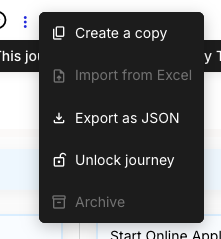
* **Import from Excel** and **Archive**, both greyed out in the title menu
* Undo, redo and the pan tool in the zoom control
  {% endcolumn %}

{% column %}
**Still available**

* Comments on cards
* **Filter** and **Views**
* The History panel and the favourite star
* **Share**, including **Manage access** and **Share link (view-only)**
* Export, **Create a copy** and **Export as JSON**
  {% endcolumn %}
  {% endcolumns %}

{% hint style="warning" %}

#### **Important: The lock applies to you too**

Locking takes editing away from everyone who has access, including the person who locked it. Unlock the map before making changes yourself.
{% endhint %}

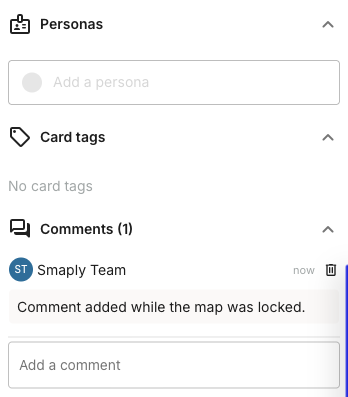
Double-clicking a card still opens its details panel, where the **Add a comment** box works as usual. **Add a persona** is disabled and there's no way to add card tags.

<figure><img src="https://1197101183-files.gitbook.io/~/files/v0/b/gitbook-x-prod.appspot.com/o/spaces%2For99xDEElfps9uMDY60K%2Fuploads%2Fgit-blob-0a10262763c6f6de7c77c1b808cbae7857ede283%2Fjourney-maps-lock-11-locked-comment-posted-crop.png?alt=media" alt="The card details panel on a locked journey map. The Add a persona field is greyed out, Card tags reads &#x27;No card tags&#x27; with no add option, and Comments (1) shows a posted comment above an enabled Add a comment box."><figcaption><p>Card details on a locked map</p></figcaption></figure>

In the journey maps list, a padlock next to the map name marks a locked map.

<figure><img src="https://1197101183-files.gitbook.io/~/files/v0/b/gitbook-x-prod.appspot.com/o/spaces%2For99xDEElfps9uMDY60K%2Fuploads%2Fgit-blob-31d164953c130377e97de7d4ea7650e7471d4cde%2Fjourney-maps-lock-13-list-row-locked-crop.png?alt=media" alt="A journey maps list row showing a padlock icon next to the map name, followed by the favourite star, a Healthy performance indicator, and the last-viewed time."><figcaption><p>Journey maps list > locked row</p></figcaption></figure>

***

#### How to unlock a journey map

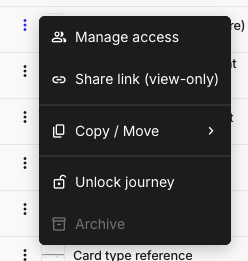
Unlocking is one click with no confirmation. Open the same three-dot menu, on the map's row in the journey maps list or next to the title in the editor, and select **Unlock journey**. Everyone gets editing back straight away.

<figure><img src="https://1197101183-files.gitbook.io/~/files/v0/b/gitbook-x-prod.appspot.com/o/spaces%2For99xDEElfps9uMDY60K%2Fuploads%2Fgit-blob-c7e38e111afda042920baecb6906ad388c3d4f43%2Fjourney-maps-lock-14-list-row-menu-locked-crop.png?alt=media" alt="A locked map&#x27;s row menu in the journey maps list, showing Manage access, Share link (view-only), Copy / Move, Unlock journey with an open-padlock icon, and a greyed-out Archive."><figcaption><p>Journey maps list > row menu, locked</p></figcaption></figure>

<figure><img src="https://1197101183-files.gitbook.io/~/files/v0/b/gitbook-x-prod.appspot.com/o/spaces%2For99xDEElfps9uMDY60K%2Fuploads%2Fgit-blob-db984d2448c04b3df25d087b06cf3b3620294229%2Fjourney-maps-lock-09-editor-title-menu-locked-crop.png?alt=media" alt="The editor&#x27;s title menu on a locked map, showing Create a copy, a greyed-out Import from Excel, Export as JSON, Unlock journey with an open-padlock icon, and a greyed-out Archive."><figcaption><p>Editor > title menu, locked</p></figcaption></figure>

**Archive** is one of the actions that comes back, so unlock a map first if you want to archive it.

***

#### Related topics

<table data-column-title-hidden data-view="cards"><thead><tr><th>Title</th><th>Description</th><th data-hidden data-card-target data-type="content-ref">Target</th></tr></thead><tbody><tr><td><strong>How to archive a journey map</strong></td><td>Take a map out of the active list. Locking keeps the map active and visible, archiving moves it aside.</td><td><a href="/journey-maps/how-to-archive-a-journey-map.md">Archive a journey map</a></td></tr><tr><td><strong>How to use version history</strong></td><td>Preview and restore an earlier version of a journey map, and what the Editing locked preview banner means.</td><td><a href="/journey-maps/how-to-use-version-history.md">Version history</a></td></tr><tr><td><strong>How to comment on a card</strong></td><td>Leave and reply to feedback on cards, which keeps working while a map is locked.</td><td><a href="/journey-maps/cards/how-to-comment-on-a-card.md">Comment on a card</a></td></tr><tr><td><strong>Access levels and permissions</strong></td><td>What Admin, Editor, and Viewer can do, and how account, workspace, and map access decide who sees what.</td><td><a href="/account-and-team/users-and-roles/access-levels-and-permissions.md">Access levels and permissions</a></td></tr></tbody></table>


---

# Agent Instructions
This documentation is published with GitBook. GitBook is the documentation platform designed so that both humans and AI agents can read, navigate, and reason over technical content effectively. Learn more at gitbook.com.

## Querying This Documentation
If you need additional information that is not directly available in this page, you can query the documentation dynamically by asking a question.

Perform an HTTP GET request on the current page URL with the `ask` query parameter, and the optional `goal` query parameter:

```
GET https://helpdesk.smaply.app/journey-maps/how-to-lock-a-journey-map.md?ask=<question>&goal=<endgoal>
```

`ask` is the immediate question: it should be specific, self-contained, and written in natural language.
`goal` is optional and describes the broader end goal you are ultimately trying to accomplish on behalf of the user. GitBook uses it to tailor the answer towards what is most useful for that goal.

The response will contain a direct answer to the question and relevant excerpts and sources from the documentation.

Use this mechanism when the answer is not explicitly present in the current page, you need clarification or additional context, or you want to retrieve related documentation sections.