> For the complete documentation index, see [llms.txt](https://helpdesk.smaply.app/llms.txt). Markdown versions of documentation pages are available by appending `.md` to page URLs; this page is available as [Markdown](https://helpdesk.smaply.app/portfolio/how-to-add-evidence.md).

# How to add evidence to a portfolio item

To add evidence to a portfolio item, open it, go to the **Evidence** tab, and click **+ Add** to record a quote, a piece of feedback, or a link to a source. Quotes promoted from research land on the same tab.

{% hint style="warning" icon="list-check" %}

#### Prerequisites

You need a portfolio item to add evidence to, and an Editor or Admin role on the workspace.
{% endhint %}

#### How to add evidence by hand

{% stepper %}
{% step %}
**Open the portfolio item and go to the Evidence tab**

Open the item from the **Portfolio** or from a portfolio item card on a journey map, then select the **Evidence** tab.
{% endstep %}

{% step %}
**Click + Add**

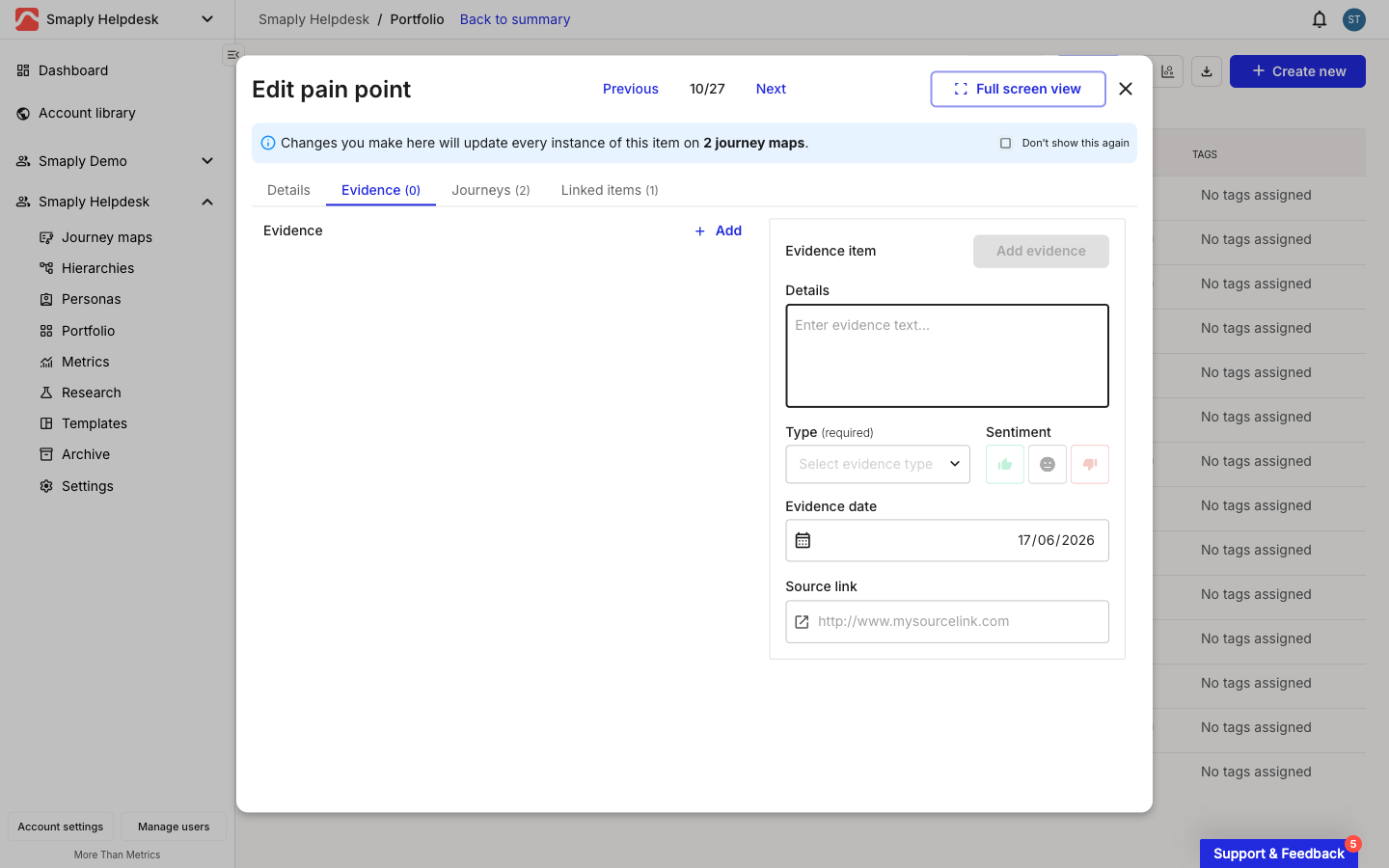
A blank **Evidence item** form opens on the tab.

<figure><img src="/files/rXrnKwNaukrl6RA5J0zx" alt="A blank evidence form on the Evidence tab, with a Details text box, a Type dropdown, three sentiment buttons, an Evidence date field, and a Source link field."><figcaption><p>The manual evidence form</p></figcaption></figure>
{% endstep %}

{% step %}
**Fill in the evidence**

Enter the **Details** (the quote or note) and pick a **Type**: **Quote**, **Feedback**, or **Other**. Type and Details are required. Optionally set the **Sentiment** (positive, neutral, or negative), an **Evidence date**, and a **Source link** back to where the evidence came from.

<figure><img src="/files/QeBIBo3mX77Q4nwl13RT" alt="The Type dropdown on the evidence form open, showing the options Quote, Feedback, and Other."><figcaption><p>Choosing the evidence type</p></figcaption></figure>
{% endstep %}

{% step %}
**Save the evidence**

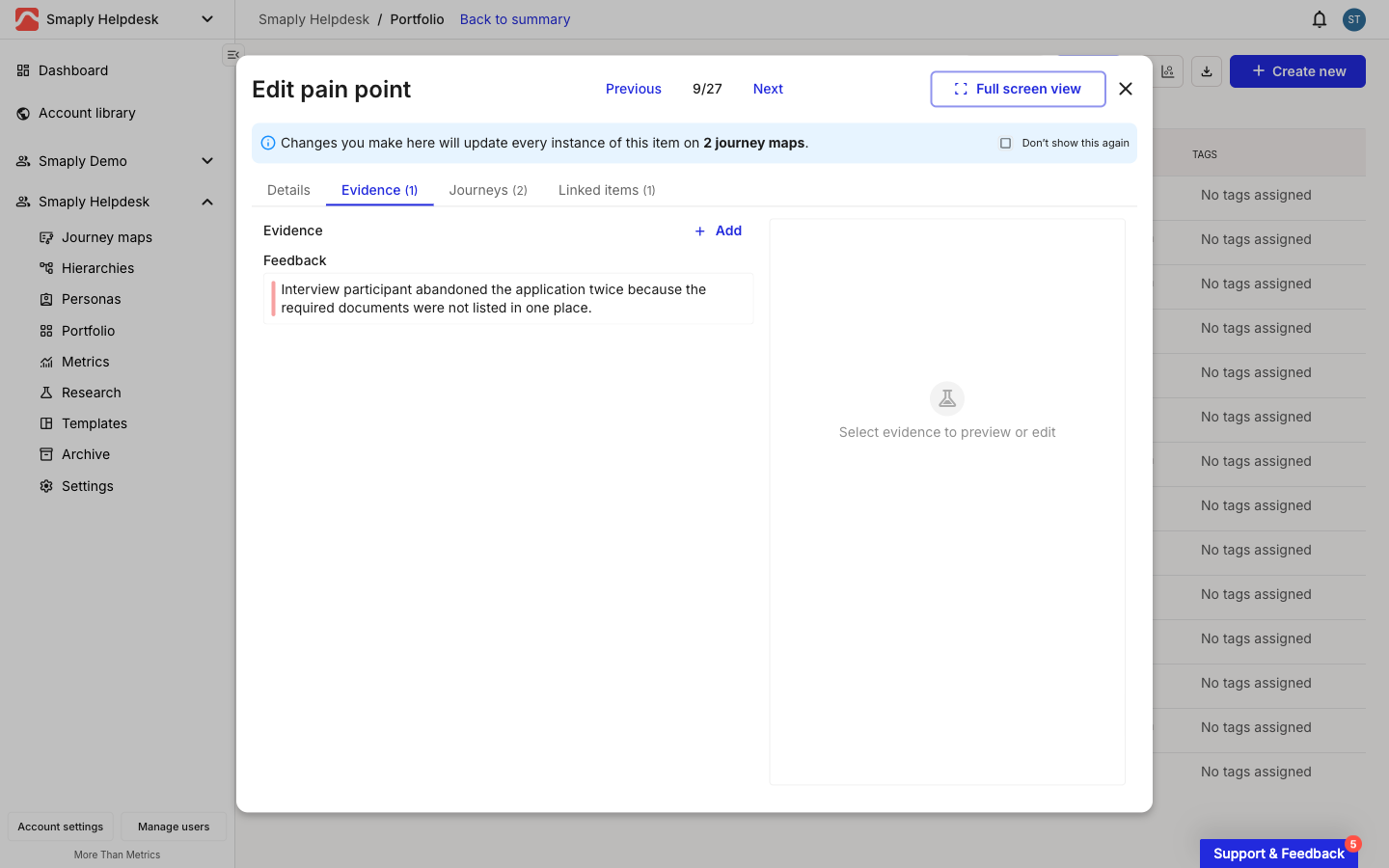
Click **Add evidence**. The entry appears on the **Evidence** tab, grouped by type, with a coloured edge that matches its sentiment.

<figure><img src="/files/Rfmhtz5dmb6rYuVqHpSB" alt="The Evidence tab with one saved entry grouped under its type heading, showing a coloured left edge matching its sentiment."><figcaption><p>A saved piece of evidence on the Evidence tab</p></figcaption></figure>
{% endstep %}
{% endstepper %}

***

#### How to add evidence from research

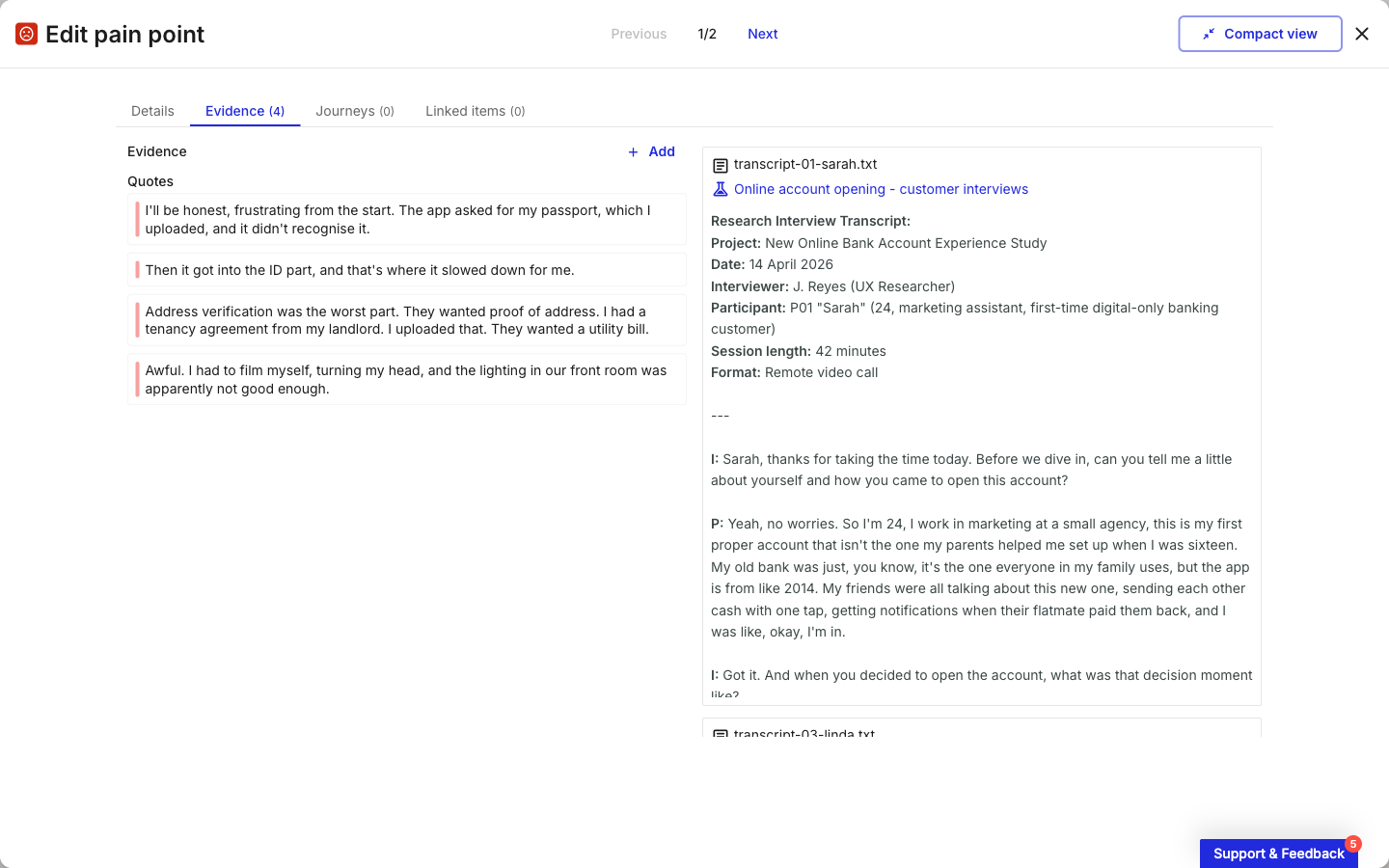
You do not have to enter every piece of evidence by hand. When you promote an insight from a Research Hub investigation, its quotes are attached to the portfolio item's **Evidence** tab automatically, each one traceable back to its source transcript. Select a research quote on the tab to open its source with the quote highlighted, and use **Unlink quote** there to detach it without changing the original.

<figure><img src="/files/MxBnJctia0DMd506W04E" alt="The Evidence tab of a portfolio item promoted from research, listing quotes on the left and the full source transcript on the right with a link back to the investigation."><figcaption><p>Evidence carried over from a research investigation</p></figcaption></figure>

For the full flow of promoting insights and tracing them back to their source, see [How to add findings to portfolio](/research-hub/how-to-add-findings-to-portfolio.md).

#### Related topics

<table data-column-title-hidden data-view="cards"><thead><tr><th>Article</th><th>What it covers</th><th data-hidden data-card-target data-type="content-ref">Target</th></tr></thead><tbody><tr><td><strong>How to add findings to portfolio</strong></td><td>Promote research insights into portfolio items, with quotes carried as evidence.</td><td><a href="/pages/rMOU7uLeTQCUU7SflZu0">/pages/rMOU7uLeTQCUU7SflZu0</a></td></tr><tr><td><strong>How to create a portfolio item</strong></td><td>Create pain points, opportunities, solutions, and custom-typed items.</td><td><a href="/pages/ccKByq3EkMP6r9UQIneW">/pages/ccKByq3EkMP6r9UQIneW</a></td></tr><tr><td><strong>How to link portfolio items</strong></td><td>Connect related items, like a pain point to its solution.</td><td><a href="/pages/iDGXQS6w1CP6Vkc7j5BA">/pages/iDGXQS6w1CP6Vkc7j5BA</a></td></tr><tr><td><strong>How to review insights and quotes</strong></td><td>Refine insights and quotes in an investigation before promoting them.</td><td><a href="/pages/YT2UFNzR9ohQUKQsKECn">/pages/YT2UFNzR9ohQUKQsKECn</a></td></tr></tbody></table>


---

# Agent Instructions
This documentation is published with GitBook. GitBook is the documentation platform designed so that both humans and AI agents can read, navigate, and reason over technical content effectively. Learn more at gitbook.com.

## Querying This Documentation
If you need additional information that is not directly available in this page, you can query the documentation dynamically by asking a question.

Perform an HTTP GET request on the current page URL with the `ask` query parameter, and the optional `goal` query parameter:

```
GET https://helpdesk.smaply.app/portfolio/how-to-add-evidence.md?ask=<question>&goal=<endgoal>
```

`ask` is the immediate question: it should be specific, self-contained, and written in natural language.
`goal` is optional and describes the broader end goal you are ultimately trying to accomplish on behalf of the user. GitBook uses it to tailor the answer towards what is most useful for that goal.

The response will contain a direct answer to the question and relevant excerpts and sources from the documentation.

Use this mechanism when the answer is not explicitly present in the current page, you need clarification or additional context, or you want to retrieve related documentation sections.